Software description
Trew view of source files
WARNING!!! DEPRECATED, TO BE UPDATED
The tree view of source files is illustrated in figure Fig. 43.
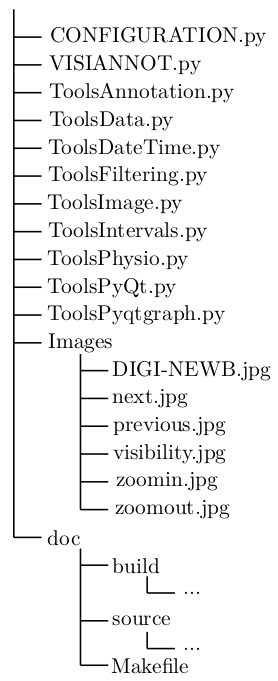
Fig. 43 Tree view of source files
CONFIGURATION.py is a module with classes useful to launch the configuration tool (see section User guide: configuration).
VISIANNOT.py is a module with classes useful to launch ViSiAnnoT.
ToolsAnnotation.py is a module with functions for reading annotation files.
ToolsData.py is a module with functions for loading data in format txt, h5 or mat as well as doing some basic processing.
ToolsDateTime.py is a module with functions for converting and formatting date/times.
ToolsImage.py is a module with functions for reading images and loading video data.
ToolsPhysio.py is a module with functions for loading files with specific physiological data (so far, ECG with QRS beat detection).
ToolsPyQt.py is a module with PyQt5 sub-classes and functions for easily creating widgets.
ToolsPyqtgraph.py is a module with Pyqtgraph sub-classes, as well as functions for easily creating widgets with scientific graphics.
Images is a folder with images displayed in the ViSiAnnoT window.
doc is a folder with the documentation generated by Sphinx.
Class diagrams
WARNING!!! DIAGRAMS DEPRECATED, TO BE UPDATED
Configuration
Figure Fig. 44 is the class diagram of textbf{ConfigurationWindow} class which launches the configuration tool (see section ref{sec:configuration}). It is composed of classes from PyQt5.QtWidgets.
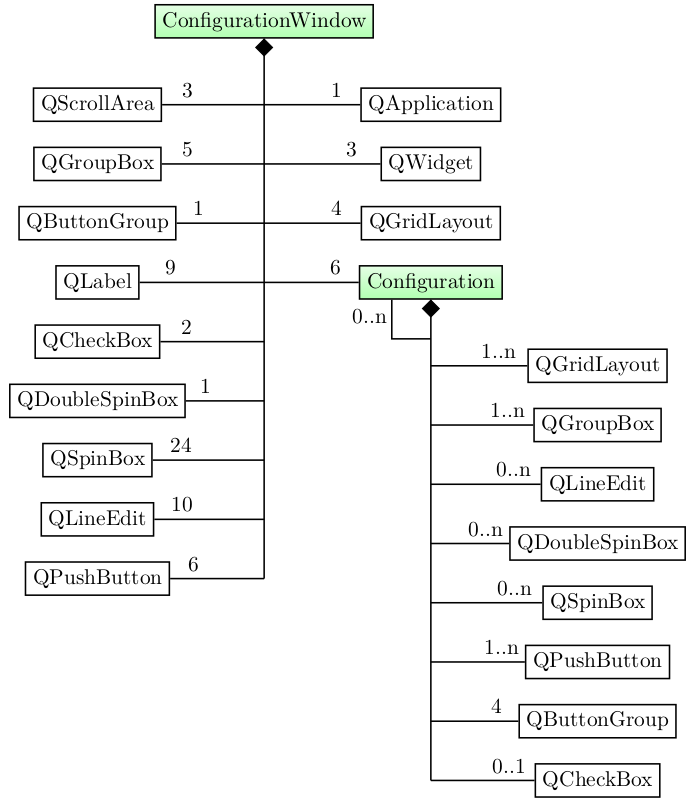
Fig. 44 Class diagram of ConfigurationWindow (attributes and methods are not provided) where the classes we implemented are highlighted in green and the other classes are from PyQt5.QtWidgets
QApplication class is necessary for the GUI to run.
QWidget class contains a window. There are 3 windows. An instance of QGridLayout is associated to each window and is the layout to fill. An instance of QScrollArea is associated to each window.
There are 5 instances of QGroupBox that are present in the 3 windows at launch, each one of them has an associated instance of QGridLayout for filling.
The instance of QButtonGroup groups the push buttons for loading and saving configuration files as well as closing the window.
We implemented the Configuration class for creating and setting configurations. There are 5 instances: video, signal, threshold, interval and annotation. Each one of them is added to a layout (QGridLayout). Every time the user creates a configuration, an instance of QGroupBox and its associated layout (QGridLayout) are added. An instance of Configuration can have a list of Configuration children. For example, in the configuration GUI, the signal configuration has 2 children: threshold and interval. There are 4 instances of QButtonGroup: for showing children windows, for adding a configuration, for deleting a configuration, for changing data directory. In some cases, they might be empty.
ViSiAnnoT
Figure Fig. 45 is the class diagram of ViSiAnnoTMultipleRec, which launches ViSiAnnoT in the context of long recordings (see section Management of long recording).
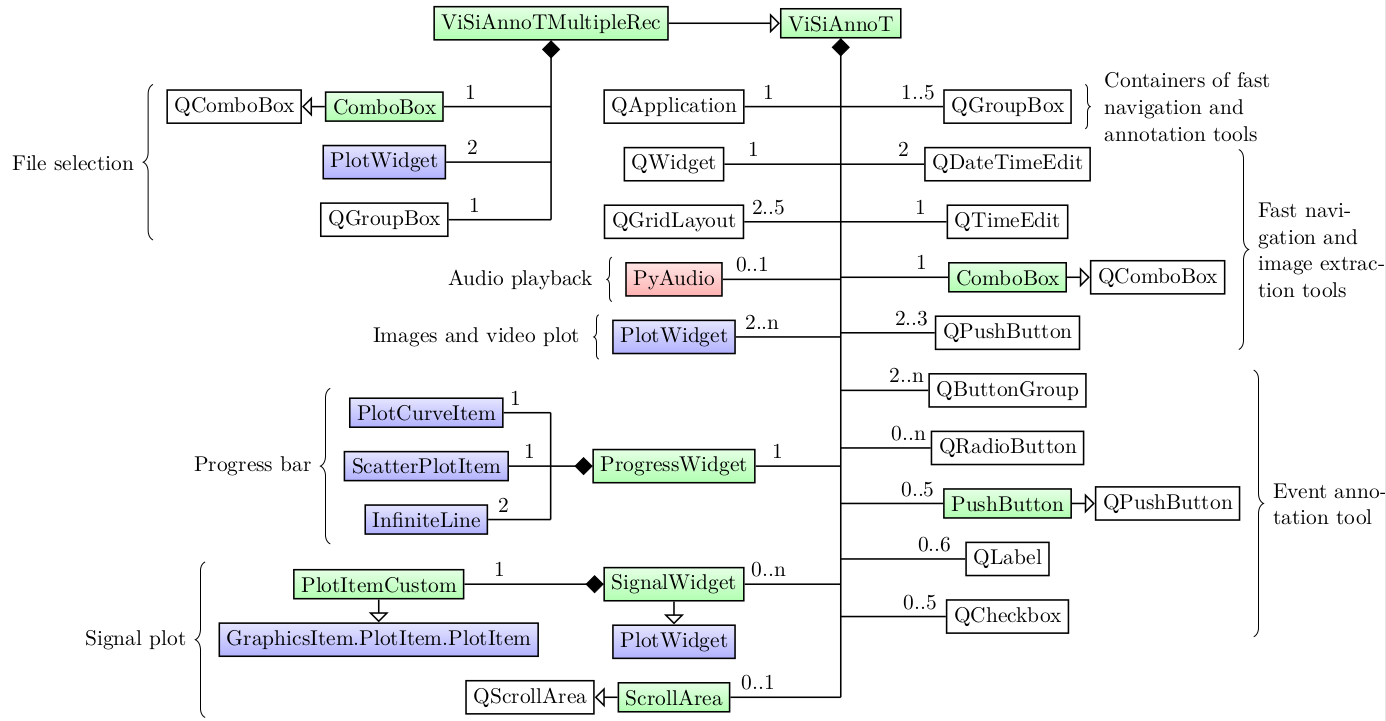
Fig. 45 Class diagram of ViSiAnnoTMultipleRec (attributes and methods are not provided) where the classes we implemented are highlighted in green, the classes of pyaudio package are highlighted in red, the classes of pyqtgraph package are hightlighted in blue and the other classes are from PyQt5.QtWidgets
ViSiAnnoTMultipleRec inherits from ViSiAnnoT. The file selection in the long recordings is handled by 2 instances of PlotWidget with “previous” and “next” images and an instance of ComboBox. This class inherits from QComboBox so that keyboard interaction is ignored.
QApplication class is necessary for the GUI to run.
QWidget class contains the window, to which is associated an instance of QGridLayout for filling it.
There are between 1 and 4 instances of QGroupBox, each one of them has an associated instance of QGridLayout for filling. These group boxs contain fast navigations and/or annotation tools.
We implemented the ProgressWidget class for the progress bar. It is composed of an instance of PlotCurveItem for the background blue line, an instance of ScatterPlotItem for the current position cursor (red dot) and two instances of InfiniteLine for the current temporal range bounds.
We implemented the SignalWidget class for plotting signals. It inherits from PlotWidget. The constructor is re-implemented so that an instance of PlotItemCustom is used as the central item of the widget. PlotItemCustom inherits from GraphicsItem.PlotItem.PlotItem, so that the effect of the “auto-range” button is only applied on the Y axis. We re-implemented the QScrollArea class in ScrollArea so that we can add a scroll area containing the signal widgets while ignoring the wheel event for scrolling. Thus, the wheel event is only applied on the plot items.