Software description
Trew view of source files
The tree view of source files is reported below:
|__ visiannot
    |__ visiannot/configuration
        |__ Configuration.py
        |__ ConfigurationWindow.py
        |__ __init__.py
        |__ update.py
    |__ visiannot/tools
        |__ audio_loader.py
        |__ data_loader.py
        |__ __init__.py
        |__ datetime_converter.py
        |__ pyqt_overlayer.py
        |__ pyqtgraph_overlayer.py
        |__ video_loader.py
    |__ visiannot/visiannot
        |__ visiannot/visiannot/components
            |__ visiannot/visiannot/components/Images
                |__ next.jpg
                |__ previous.jpg
                |__ visibility.jpg
                |__ zoomin.jpg
                |__ zoomout.jpg
            |__ MenuBar.py
            |__ Signal.py
            |__ WindowsPopUp.py
            |__ __init__.py
            |__ AnnotEventWidget.py
            |__ AnnotImageWidget.py
            |__ CustomTemporalRangeWidget.py
            |__ FileSelectionWidget.py
            |__ FromCursorTemporalRangeWidget.py
            |__ LogoWidgets.py
            |__ ProgressWidget.py
            |__ SignalWidget.py
            |__ VideoWidget.py
        |__ ViSiAnnoT.py
        |__ ViSiAnnoTLongRec.py
        |__ ViSiAnnoTLongRecFromConfigFile.py
        |__ ViSiAnnoTLongRecFromConfigGUI.py
        |__ __init__.py
    |__ __init__.py
    |__ __main__.py
|__ doc
    |__ doc/source
        |__ doc/source/images
            ...
        |__ doc/source/APIreference
            ...
        |__ index.rst
        |__ conf.py
        |__ exe.rst
        |__ install.rst
        |__ software.rst
        |__ further.rst
        |__ pkg_name.py
        |__ intro.rst
        |__ license.rst
        |__ userguide-configuration.rst
        |__ userguide-visiannot.rst
        |__ userguide-pyqt_overlayer.rst
        |__ userguide-pyqtgraph_overlayer.rst
        |__ support.rst
    |__ Makefile
    |__ requirements.txt
|__ exe_generation
    |__ convert_img_to_icon.py
    |__ visiannot.spec
|__ README.md
|__ setup.py
|__ LICENSE.txt
|__ .gitignore
|__ .readthedocs.yaml
|__ MANIFEST.in
|__ synchro.pptx
|__ class_diagram.pptx
The folder exe_generation contains the configuration file in order to generate an executable file (see Creating a standalone executable).
The files setup.py and MANIFEST.in are used to publish the package on PyPI.
The file .readthedocs.yaml is useful for the documentation generation on ReadTheDocs.
The PPTX files contain some figures of the documentation.
Source code
The source code is in the folder visiannot. The package is structured as follows:
The sub-package visiannot.configuration contains the classes for the GUI configuration tool and the module
updatefor custom configuration (see Customization).The sub-package visiannot.tools contains the following modules:
audio_loader: functions for loading audio files,data_loader: functions for loading data in format txt, h5 or mat as well as doing some basic processing,datetime_converter: functions for converting and formatting date/times,pyqt_overlayer: PyQt5 sub-classes and functions that ease GUI creation,pyqtgraph_overlayer: Pyqtgraph sub-classes and functions that ease creation of scientific graphics,video_loader: functions for loading images and video data,
The sub-package visiannot.visiannot contains the classes defining the GUI for multimodal data visualization and annotation, as well as the sub-package visiannot.components that contains the classes defining the GUI components.
Documentation
The documentation is in the folder doc. The subfolder source contains the RST files, the images and the API reference. The file requirements.txt lists all the required packages for ReadTheDocs.
Before generating the documentation for the first time or after having updated the source code, the following commands must be launched at the root of the repository:
Generation of tree view of code source:
python3 -m tools_doc_sphinx.tree_view_source_code .It is not necessary to run this command if the files structure has not changed, a file
tree_view.txtis created and its content must replace the tree view above.
Generation of API reference index files:
python3 -m tools_doc_sphinx.auto_doc_api visiannot doc/source
The package tools_doc_sphinx must be installed to run these commands.
In order to generate the HTML pages locally, the following command must be launched inside folder doc: make clean && make html. It is required to install Sphinx.
An additional extension is required: https://autodocsumm.readthedocs.io/en/latest/index.html.
Class diagrams
Configuration
Figure Fig. 46 is the class diagram of ConfigurationWindow, which launches the configuration GUI (see Configuration with the graphical user interface).
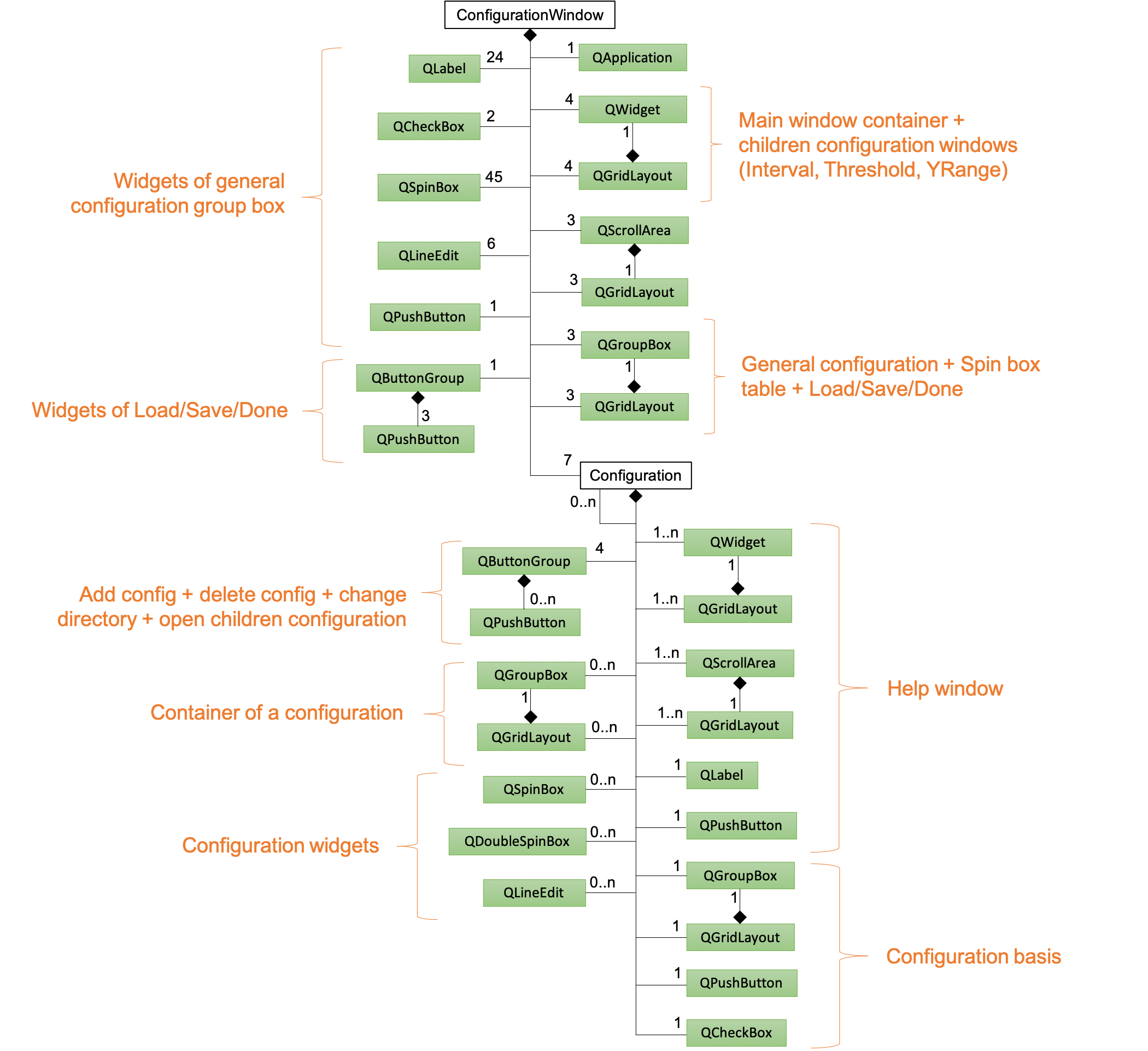
Fig. 46 Class diagram of ConfigurationWindow (attributes and methods are not provided), classes from PyQt5.QtWidgets are hightlighted in green
The windows are contained in an instance of QWidgets filled with an instance of QGridLayout. There is one instance for the main window and three other instances for the children configuration windows (interval, threshold, Yrange). For each window of child configuration, an instance of QScrollArea is created.
The class Configuration is used to create and set configurations. There are 7 instances: video, signal, threshold, interval, Yrange, events annotation and image annotation. An instance of Configuration can have a list of Configuration children. In particular, the signal configuration has 2 children: threshold and interval.
ViSiAnnoT
Figure Fig. 47 is the class diagram of ViSiAnnoTLongRec, which launches ViSiAnnoT in the context of long recordings (see section Management of long recording).
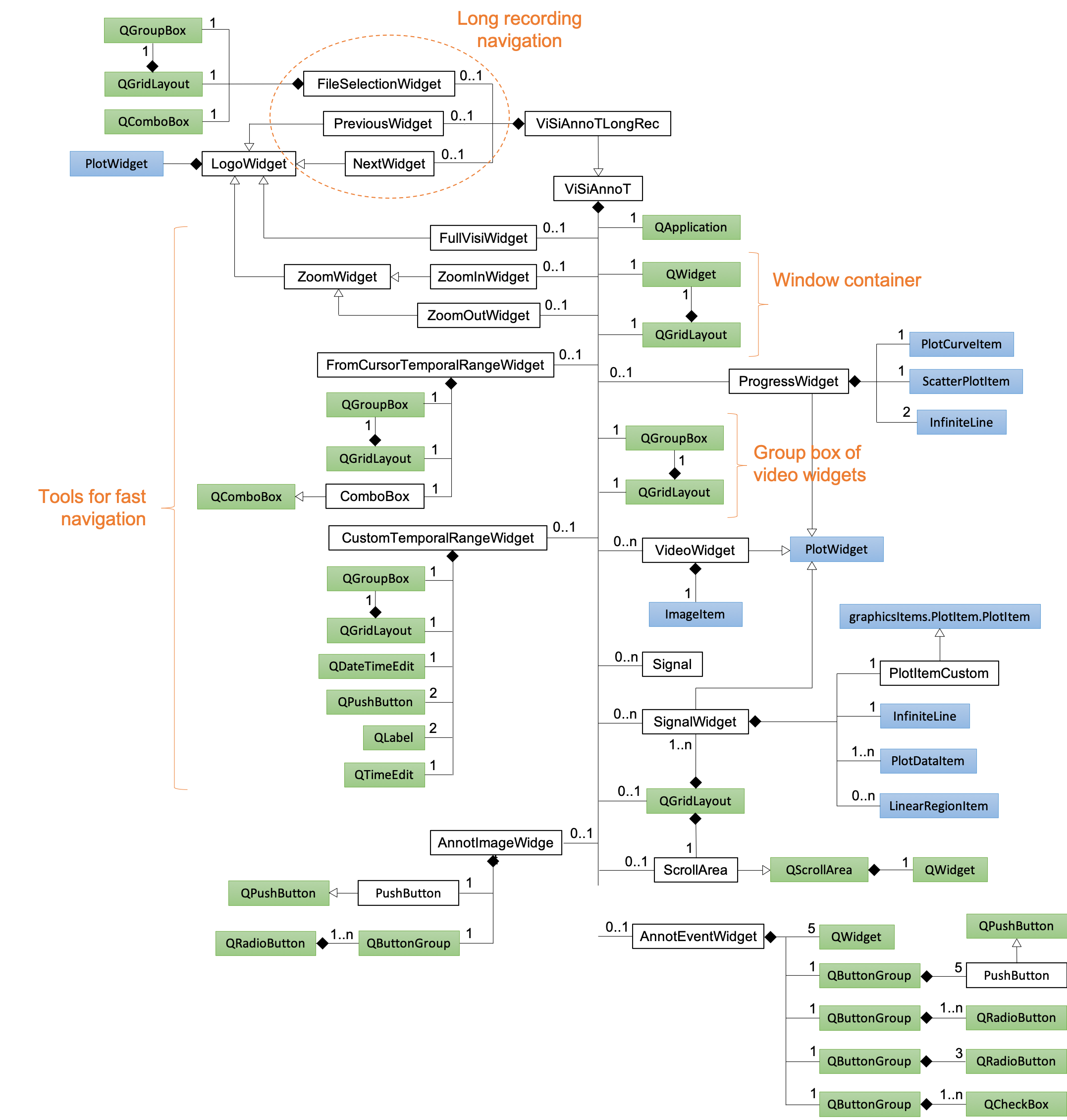
Fig. 47 Class diagram of ViSiAnnoTMultipleRec (attributes and methods are not provided), classes from PyQt5.QtWidgets are hightlighted in green, classes from pyqtgraph are hightlighted in blue
ViSiAnnoTMultipleRec inherits from ViSiAnnoT.
The class ProgressWidget defines the progress bar. It is composed of an instance of PlotCurveItem for the background blue line, an instance of ScatterPlotItem for the current position cursor (red dot) and two instances of InfiniteLine for the current temporal range bounds.
The class SignalWidget defines the widgets for plotting signals. It inherits from PlotWidget. The constructor is re-implemented so that an instance of PlotItemCustom is used as the central item of the widget. PlotItemCustom inherits from GraphicsItem.PlotItem.PlotItem, so that the effect of the “auto-range” button is only applied on the Y axis. We re-implemented the QScrollArea class in ScrollArea so that we can add a scroll area containing the signal widgets while ignoring the wheel event for scrolling. Thus, the wheel event is only applied on the plot items.